In Omdia’s 2026 software supply chain security report, 73% of organizations that generate SBOMs say they enable more efficient vulnerability mitigation, yet 86% still find the generation process challenging. That gap between recognized value and operational difficulty is where most teams are stuck. For teams building and securing containerized applications, understanding what an SBOM is, and how to make it useful, is no longer optional.
This guide covers what SBOMs contain, why they matter for software supply chain security, how standard formats and tooling work, and where the industry is headed with regulations and enforcement.
Key takeaways
- An SBOM is a machine-readable inventory of every component inside a software artifact.
- SBOMs gain real value when paired with provenance attestations and cryptographic signatures.
- Generating SBOMs at image build time captures the full dependency tree, including OS packages.
- Regulatory mandates (EO 14028, CISA guidance, EU CRA) are making SBOMs a procurement baseline.
What is an SBOM?
Every software artifact ships with dependencies. A container image based on Alpine Linux might include dozens of system packages, each with its own version, license, and upstream maintainer. An application layer on top adds frameworks, libraries, and transitive dependencies that the developer may never have explicitly chosen. The deeper the stack, the harder it becomes to answer a basic question: what is actually running in production?
A software bill of materials answers that question. It’s a structured, machine-readable inventory of every component, library, and module inside a software artifact. Where a package manifest like package.json or requirements.txt lists declared dependencies, an SBOM captures the resolved dependency tree after the build, including transitive dependencies, system-level packages, and metadata about each component’s origin, version, and license. Think of it as a nutrition label for software.
What an SBOM contains
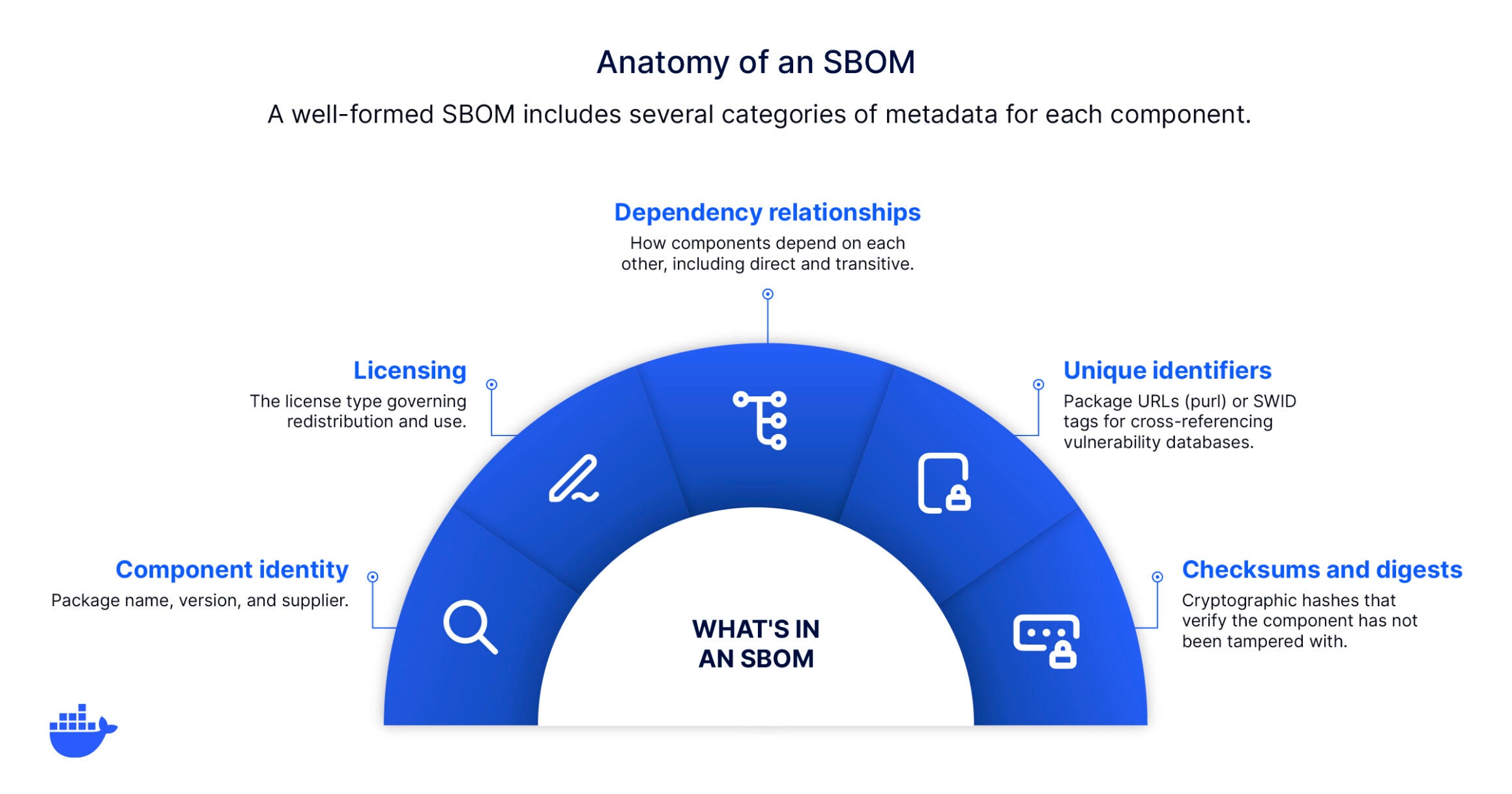
A well-formed SBOM includes several categories of metadata for each component:
- Component identity: Package name, version, and supplier (e.g., openssl 3.1.4, maintained by the OpenSSL Project)
- Licensing: The license type governing redistribution and use (MIT, Apache 2.0, GPL)
- Dependency relationships: How components depend on each other, including direct and transitive dependencies
- Unique identifiers: Package URLs (purl) or SWID tags that enable cross-referencing against vulnerability databases
- Checksums and digests: Cryptographic hashes that let consumers verify the component has not been tampered with
This data is structured using open standards, primarily SPDX or CycloneDX, to keep it machine-readable and interoperable across tools, registries, and compliance workflows. In practice, an SPDX SBOM entry for a single package looks like this:
{
  "name": "openssl",
  "SPDXID": "SPDXRef-Package-openssl",
  "versionInfo": "3.1.4",
  "supplier": "Organization: OpenSSL Project",
  "licenseDeclared": "Apache-2.0",
  "checksums": [{ "algorithm": "SHA256", "value": "a1b2c3..." }]
}
A real SBOM contains one entry like this for every component in the artifact, from the base image’s OS packages up through the application’s runtime dependencies.
Why SBOMs matter for software supply chain security
The value of an SBOM becomes clear the moment something goes wrong. When the Log4Shell vulnerability was disclosed in December 2021, organizations with current SBOMs could query their inventories and identify every affected image within minutes. Teams without them spent days manually tracing dependencies across registries and deployment manifests.
Sonatype’s research found that nearly 65% of open source CVEs lack an NVD-assigned CVSS score, and when scored independently, 46% turned out to be high or critical. Without an SBOM, those unscored vulnerabilities are invisible.
Faster incident response
When a new CVE drops, the first question is always where are we exposed? An SBOM makes that question answerable in seconds rather than days. Cross-reference the affected package and version against your SBOM library, and you have an immediate blast radius. Pair the SBOM with continuous vulnerability scanning and the process becomes automated: new CVEs are matched against existing SBOMs, and affected images are flagged without manual intervention.
Customer spotlight: JWP, a video streaming platform serving more than 1 billion users, enabled vulnerability scanning across 400+ repositories in under an hour. With SBOMs feeding their scanning pipeline, the team fixed thousands of vulnerabilities while filtering out tens of thousands of non-critical issues, reducing noise and accelerating remediation.
Regulatory compliance
SBOMs are moving from best practice to legal requirements. In the United States, Executive Order 14028 helped set SBOM requirements in motion for software sold to federal agencies. CISA’s 2025 Minimum Elements guidance aims to clarify what a useful SBOM should include. The EU’s Cyber Resilience Act (EU CRA) extends similar requirements to products sold in the European market. For organizations operating in regulated industries, finance, healthcare, defense, and critical infrastructure, SBOM delivery is becoming a procurement gate.
Proactive verification, not reactive trust
SBOMs shift the security model from assuming software is safe to verifying that it is. Rather than trusting that a base image is clean because the registry says so, teams can inspect the SBOM to confirm which packages are present, which versions are running, and whether any known vulnerabilities apply.
In practice, that means writing policies against SBOM data: no image ships if it contains a package from an unapproved supplier, no end-of-life component persists past a defined grace period, no image deploys without a matching SBOM attestation. These checks can run automatically in CI, turning the SBOM from a passive document into an active gate.
When combined with provenance attestations and cryptographic signatures, the SBOM becomes one layer in a verifiable chain of custody from source to deployment. You’re no longer taking the registry’s word for it. You’re cryptographically verifying it.
SBOM formats and standards
For an SBOM to be useful across teams, tools, and organizations, it needs a shared language. Two open standards dominate the landscape, each designed for a different primary use case.
SPDX (Software Package Data Exchange)
Developed by the Linux Foundation (ISO/IEC 5962:2021), SPDX is the most widely adopted format for license compliance and open source auditing. It is also the format used by BuildKit’s built-in SBOM generator, which attaches an SPDX document as an attestation to the container image during the build.
CycloneDX
Developed by the OWASP Foundation, CycloneDX is optimized for security workflows and DevSecOps pipelines. It includes fields for vulnerability metadata and dependency graphs, and integrates well with tools like OWASP Dependency-Track.
SBOM Formats at a Glance
|
SPDX |
CycloneDX |
|
|
Primary focus |
License compliance, open source auditing |
Security, vulnerability management |
|
Governed by |
Linux Foundation (ISO/IEC 5962:2021) |
OWASP Foundation |
|
Format types |
JSON, YAML, tag-value, RDF/XML |
JSON, XML, Protocol Buffers |
|
Best for |
Compliance, due diligence, audits |
DevSecOps pipelines, CI/CD integration |
|
Container ecosystem support |
Native in BuildKit attestations |
Also produced by tools like Syft and Trivy |
If you’re building container images, start with SPDX. It’s the format BuildKit generates natively, so you get an SBOM as a build output with zero additional tooling. Your downstream scanning tools may prefer CycloneDX, and that’s fine. The two formats are interoperable, and converters exist for moving between them. Let the build produce SPDX; let consumption tools handle conversion if they need it.
SWID (Software Identification Tags), a third format governed by ISO/IEC 19770-2, is primarily used for IT asset management in enterprise and government procurement. But it has largely lost traction in cloud-native and container workflows.
How SBOMs fit into container workflows
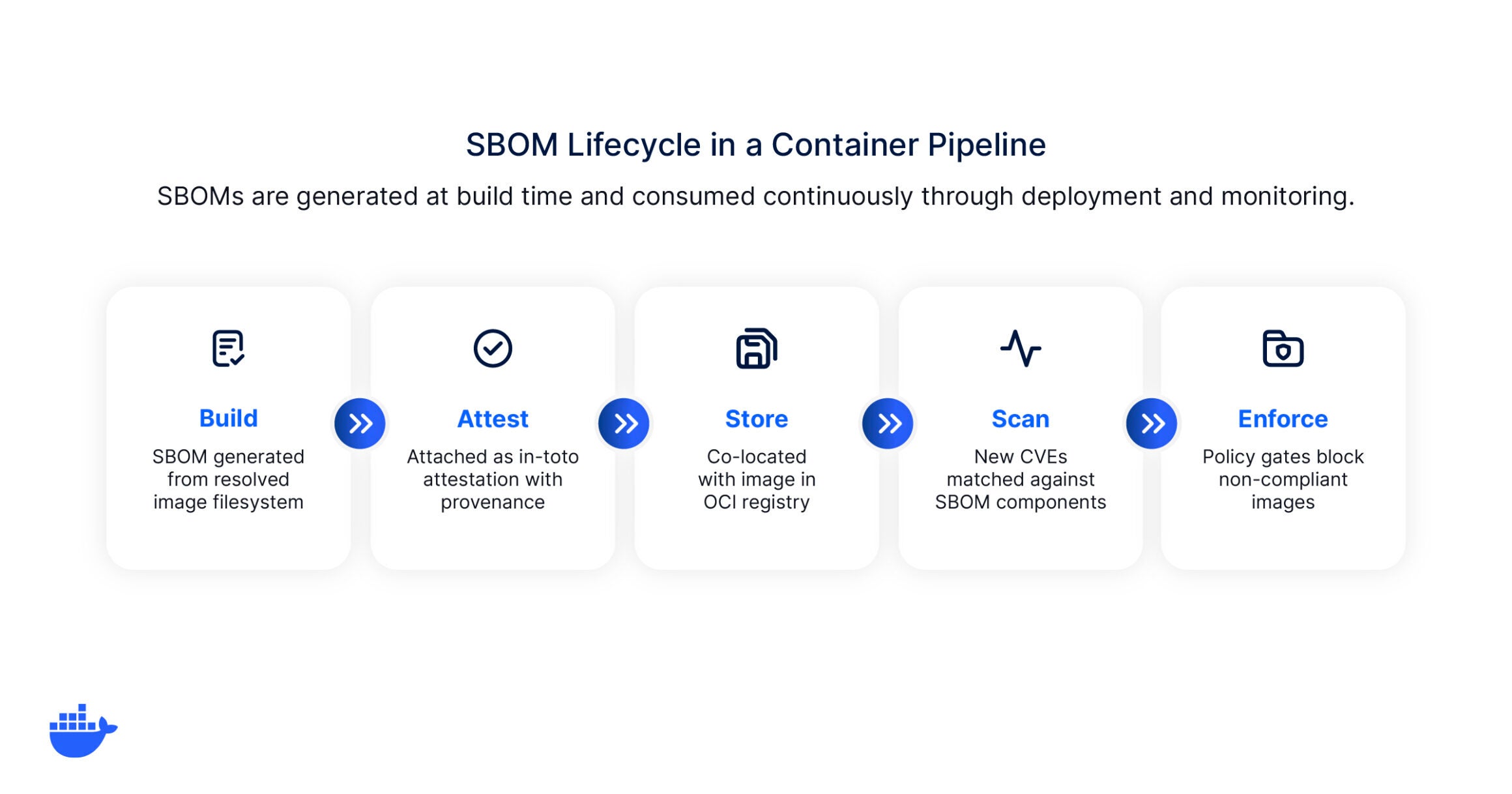
In traditional software development, SBOMs are often generated after the fact, bolted on as a compliance artifact during release. Container workflows offer a better approach: generating the SBOM at build time, as a native output of the image build process.
Build-time generation
When you build a container image with BuildKit, the builder scans the final image filesystem and produces an SBOM that reflects what actually shipped, not just what was declared in the Dockerfile. Because it captures the resolved state after all build stages complete, it includes OS-level packages, application-level dependencies, and any files copied from external sources.
Source-level SBOMs, generated from manifest files before the build, frequently miss transitive dependencies and system packages. An image-layer SBOM reflects reality.
Attestation and provenance
An SBOM tells you what’s in an image. Provenance attestations tell you how it was built: which builder, which source commit, which build platform. Together, they form a verifiable chain of evidence that auditors and policy engines can evaluate programmatically. This is the model described by SLSA (Supply-chain Levels for Software Artifacts), where Build Level 3 requires hardened build platforms with non-falsifiable provenance. SLSA is the specification; in-toto is the attestation format it uses.
The SBOM itself is attached to the image as an in-toto attestation using the SPDX predicate format. Provenance is attached the same way, so both travel with the image as verifiable, machine-readable metadata.
Registry storage
Once the image and its attestations are built, they need to live somewhere consumers can access them. Pushing the image to an OCI-compliant registry keeps the SBOM co-located with the artifact it describes. This matters because an SBOM that lives in a separate system, a shared drive, a compliance portal, or a CI artifact bucket, will eventually drift out of sync with the image it was generated from. Co-location eliminates that gap: pull the image, and you pull its SBOM and provenance with it.
Continuous scanning
With SBOMs attached to images and stored in a registry, they become inputs for continuous vulnerability monitoring. New CVEs are matched against the components listed in the SBOM without re-analyzing the image itself. Instead of re-scanning every image when a new vulnerability is disclosed, the scanner cross-references the SBOM inventory and flags affected images immediately.
Policy enforcement
Scanning identifies risk. Enforcement acts on it. Policy engines can consume SBOM data to gate deployments based on rules the team defines: no image ships if it contains a package from an unapproved supplier, no end-of-life component persists past a defined grace period, no image deploys without a matching SBOM attestation.
These checks run automatically in CI, turning the SBOM from a passive document into an active gate. You’re no longer relying on manual review to catch a problematic dependency. The pipeline catches it before the image reaches production.
SBOM maturity: Where does your organization stand?
SBOM adoption isn’t binary. Most organizations fall somewhere on a spectrum from ad hoc to fully scaled. The following maturity model helps teams assess where they are and what to prioritize next.
|
Level |
Generation |
Storage |
Scanning |
Governance |
|
Ad hoc |
Manual, on request |
Local files or shared drives |
Occasional, tool-dependent |
No formal policy |
|
Pilot |
Automated for 1–2 apps or services |
Alongside build artifacts |
Integrated into CI for pilot apps |
Basic policy drafted |
|
Production |
Automated for all new images |
Attached to images in OCI registries |
Continuous, with alerting |
Policies enforced in pipelines |
|
Scaled |
All images, including third-party ingestion |
Centralized SBOM management platform |
Continuous with policy gating |
Cross-org governance, audit trails, supplier requirements |
Omdia’s 2026 software supply chain security survey surfaced that more than half of the organizations generating SBOMs are only generating them on a case-by-case basis.
Common misconceptions about SBOMs
SBOMs are just a compliance checkbox
Teams that generate SBOMs solely to satisfy a procurement requirement are missing the operational value. SBOMs are most useful as a live data source for vulnerability management, incident response, and dependency tracking. A one-time SBOM generated for an audit and then filed away provides a false sense of coverage.
They’re the same as SCA
Software composition analysis (SCA) tools scan code or images for known vulnerabilities. An SBOM is the inventory that makes that scanning possible. SCA and SBOMs generally work together. The SBOM is the inventory, and SCA tools use that inventory, often generating their own, to check for known vulnerabilities. The distinction matters because scanning tends to be only as good as the inventory behind it.
SBOMs are a one-time artifact
An SBOM is tied to a specific image digest. Every time you rebuild an image, the SBOM should be regenerated to reflect any dependency changes. Stale SBOMs create a gap between what you think is running and what’s actually deployed. Automated build-time generation eliminates this drift.
SBOMs substitute runtime security
SBOMs tell you what shipped. They do not tell you what’s happening at runtime. An SBOM will not catch a zero-day that hasn’t been disclosed yet, detect anomalous process behavior inside a running container, or verify that the application logic is correct. SBOMs are one layer in a defense-in-depth model: they handle inventory and composition. Runtime monitoring, network policies, and access controls handle the rest.
What can go wrong without SBOMs
Let’s say a zero-day vulnerability is disclosed in a widely used library. Without SBOMs, the security team starts a manual triage: checking Dockerfiles, querying registries, asking developers which versions they use. Hours pass. Some images are missed because the affected package is a transitive dependency three levels deep. By the time the blast radius is mapped, the vulnerability has been public for two days.
With SBOMs attached to every image, the same triage takes minutes. Query the SBOM database for the affected package and version, get a list of every image that includes it, and prioritize remediation based on deployment context.
Getting started with SBOMs
The most common mistake teams make is treating SBOM adoption as a large-scale transformation project that’ll derail workflows. It doesn’t need to be.
- Start with one image. Pick a production image and enable SBOM generation on the next build. With BuildKit, that is a single flag:
|
docker buildx build –attest type=sbom –tag myapp:latest . |
Review the output. This single step often reveals transitive dependencies and OS packages you did not know were in the image.
- Automate generation in CI. Extend the flag to your CI pipeline so every image build produces an SBOM automatically.
- Store SBOMs alongside images. Attach SBOMs as attestations in your OCI registry so the SBOM stays co-located with the artifact it describes.
- Connect to monitoring. Feed SBOMs into a vulnerability monitoring tool that can continuously match components against new CVEs. This closes the loop between inventory and action.
- Set policies. Define what is acceptable: maximum CVE age, required minimum SBOM completeness, blocked licenses. Enforce these policies in the pipeline so non-compliant images are flagged before deployment.
Build with visibility, ship with confidence
SBOMs are the foundation of software supply chain security. They turn opaque software artifacts into transparent, auditable inventories that security teams, compliance officers, and developers can all use. But an SBOM alone is not enough. The real value comes when SBOMs are generated at build time, paired with provenance attestations, and continuously monitored against emerging threats.
Docker makes this workflow native. Docker Hardened Images ship with complete SBOMs, SLSA Build Level 3 provenance, OpenVEX exploitability data, and cryptographic signatures on every image. Meanwhile, Docker Scout provides continuous vulnerability monitoring powered by the SBOM data attached to your images, surfacing actionable insights across your entire image portfolio. Together, they give teams a verifiable chain of custody from source to production, with no manual assembly required.
Frequently asked questions
What does SBOM stand for?
SBOM stands for software bill of materials. It’s a structured inventory of every component, dependency, and metadata element inside a software artifact, formatted in a machine-readable standard like SPDX or CycloneDX.
Are SBOMs required by law?
In the United States, Executive Order 14028 requires SBOMs for software sold to federal agencies. CISA’s 2025 draft guidance proposes an updated set of minimum elements. The EU Cyber Resilience Act extends similar requirements to products sold in the European market. For organizations in regulated industries, SBOMs are increasingly a procurement prerequisite rather than a voluntary practice.
What is the difference between an SBOM and a package manifest?
A package manifest (package.json, requirements.txt, go.mod) lists the dependencies a developer declared. An SBOM captures the fully resolved dependency tree after the build, including transitive dependencies, system-level packages, and metadata like licenses and checksums. The manifest is an input to the build; the SBOM is an output that reflects what was actually shipped.
How often should an SBOM be updated?
An SBOM should be regenerated every time the associated artifact is rebuilt. For container images, this means generating a new SBOM with each image build. Between rebuilds, the existing SBOM remains valid for the specific image digest it describes, but new CVEs may be discovered against the components it lists. Continuous monitoring against the stored SBOM catches these without requiring a rebuild.
Source
Omdia, Securing the Software Supply Chain: Strategic Approaches to Support Scaling Development with AI Adoption, May 2026.